Widgets: Flexible Widget Sizes on Android
Currently, widget sizes on android are too awkward to place on the home screen with other widgets. Even placing multiple habitify widgets on the same screen is impossible because they cannot be shrunk past a certain point.
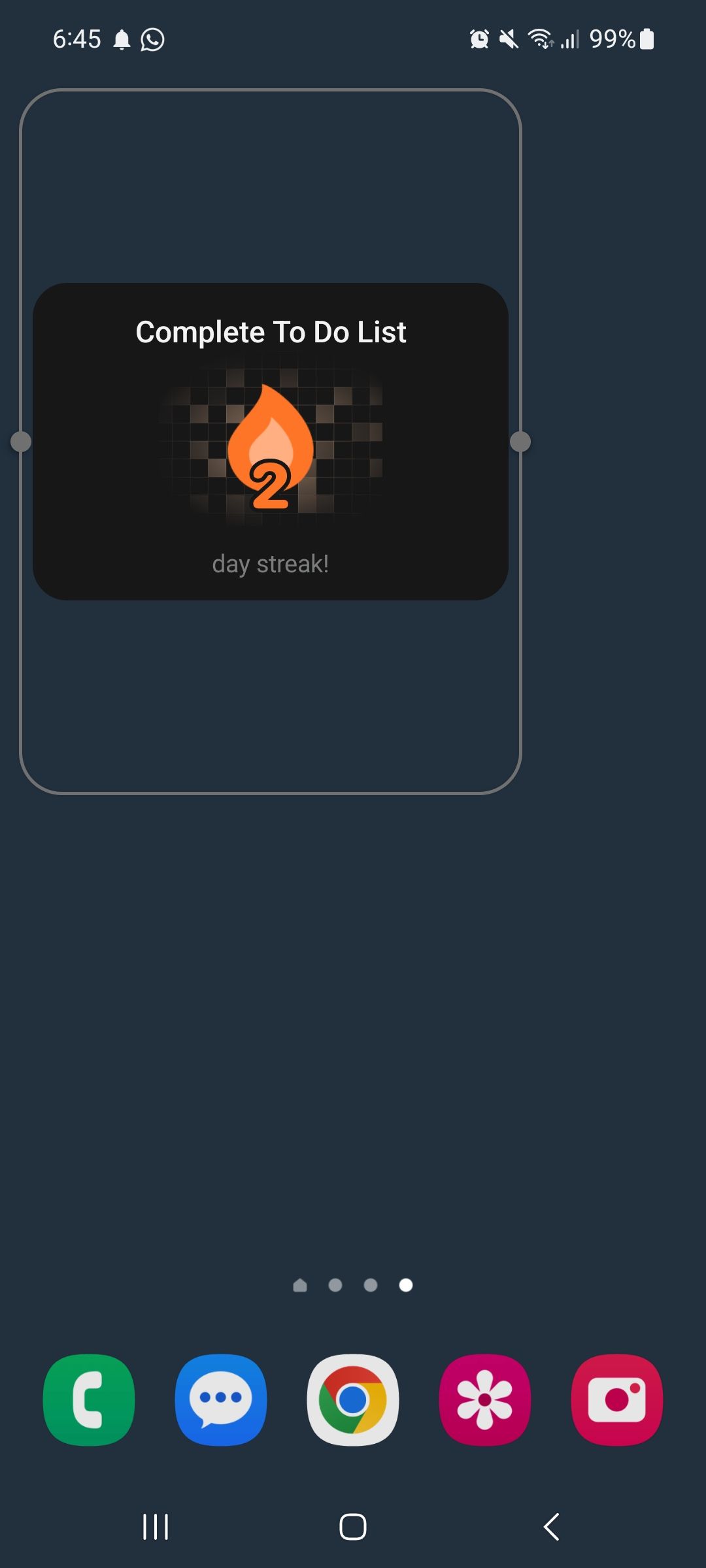
Attached, you will find an example of this. This widget cannot be shrunk further horizontally, and can't be shrunk vertically. So another instance of this same widget cannot be placed on the same page.
Comments7
An Anonymous User
Nov 4
I'd also love to have a compact 1×1 Android widget that combines the following features for a single habit:
- Shows today's completion status (completed or not completed).
- Displays the current streak count.
- Marks the habit as completed with a single tap.
- Tapping again undoes the completion.
- Updates immediately without opening the app.
Ideally, multiple 1×1 widgets could be placed side by side, each representing a different habit.
This would make it much easier to track daily habits directly from the home screen.
Minh Thư
Sep 24
Hi! Thank you for sharing your POV on the widgets. I forwarded this to the Android team. I will make sure that they look into it and find the way to optimize the widget sizing in the homescreen 🫡
LREngineer
Sep 24
•Merged request
•1 vote
Widget: Compact Widgets, like a simple 1×1
Several of the current widgets only have a starting size of 3×3, particularly the widgets for streaks. This is so big that it's practically unusable. Pleas add compact widgets like a simple 1×1 that shows your streaks.
Peter Vu
Sep 3
Hi — thanks for the idea. A smaller 1×1 streak widget would make the feature much easier to fit alongside other widgets. We’ve noted the request for compact variants rather than replacing the current larger layouts.
LREngineer
Sep 24
•Merged request
•2 votes
Widget: Ability to Adjust Widget Size on Android
I know there are several other posts about this and some of them even say that they have been completed, but I don’t see the options to resize a widget on android at all. I switched to Habitify over my old habit tracker because habitify supported a smart watch and was still being actively supported and worked on, while the old app I used wasn’t. However the widgets for this app in my opinion are severely lacking, mainly because they are all way to big. Please make it so we can size these down to reasonable sizes and please make it function not just on iOS but also on android. It seems like android is typically an after thought, and while I know you cant just apply the same fix from iOS to android, it would be nice to see some movement on this.
Minh Thư
Jan 7
Hi @LREngineer !
Thank you for your honest feedback, and we hear your concerns regarding the Android experience. We have a guide detailing widget resizing and its current limitations here: https://intercom.help/habitify-app/en/articles/12440484-resizing-widgets-ability-and-limitations.
Please rest assured that Android is definitely not an afterthought for us; we are committed to continuous improvements across both platforms and will keep working to make our widgets more flexible.
An Anonymous User
Jan 7
Thank you for sharing a post that does absolutely nothing to address the situation. Here is a sample screenshot of one of the widgets. It comes up as 3×2 but had empty space on the top and bottom. You hold down on the widget like the post says amd it gives you that blue box, but even when you drag it, it doesn't go any smaller. You can go bigger, but the widget is already huge so I dont see why anyone would want that. I hope making these widgets smaller gets added to the road map, because right now with how big they are, they are basically useless which is frustrating because there is so much the app does right. I do still like the app but there are a lots of frustrations with it too.